

October 2, 2026
Online Registration Security: Same Day NIST CISA FTC Actions for Admins

Enable TLS and phishing-resistant MFA for admin accounts, stop collecting unneeded personal data, and centralize your logging. Those four moves, drawn from guidance from the Federal Trade Commission and the Cybersecurity and Infrastructure Security Agency, close most of the gaps that lead to registration data exposure. Admins and IT staff who manage sign-up forms, whether for a conference, a membership site, or a school trip, should treat these as non-negotiable baseline settings, not future projects.
TL;DR:
- Enforce TLS everywhere and require phishing-resistant multi-factor authentication for all admin and sensitive accounts to prevent interception and credential theft.
- Minimize data collection by removing unnecessary fields, especially sensitive information like Social Security numbers, to reduce the impact of potential breaches.
- Implement role-based access control, regular account audits, and centralized logging to detect and limit unauthorized access or suspicious activity.
- Use secure vendors with proper certifications, tokenize payment data, and review third-party security practices to lower external attack risks.
- Develop a comprehensive incident response plan with regular backup testing, breach containment procedures, and staff training to quickly address potential security incidents.
Table of Contents
- Essential technical defenses: encryption, MFA, and identity controls
- Designing registration forms to minimize risk
- Logging, monitoring, and incident response for registration systems
- Evaluating and securing third-party integrations and payment processors
- Key compliance and legal guidance administrators should know
- Prioritized checklist: what to do now, next, and for verification
- How these controls apply to school and group trip registrations
- Data anonymization and pseudonymization techniques to enhance privacy
- Security training and awareness programs for staff managing registration data
- Regular security assessments and penetration testing specific to registration systems
- Backup and disaster recovery plans for registration databases
- Privacy by design principles applied to registration systems
- What admins get wrong about prioritizing registration security
- Group Travel Network: a managed option for secure group registration
- Sources
- FAQ
Essential technical defenses: encryption, MFA, and identity controls
Three technical layers do most of the work. The FTC’s data breach guidance recommends encrypting personal data both in transit and at rest, and keeping an inventory of where that data lives. TLS (the current version your hosting or form platform supports) protects data moving between a browser and your server. AES-256, or a managed key management service from your cloud provider, protects it once stored. Keys should never sit in the same database or file store as the data they protect.
Administrative accounts need stronger protection than the sign-up form itself. CISA’s guidance on multi-factor authentication recommends phishing-resistant methods such as FIDO2 security keys or certificate-based authentication over SMS codes, which attackers can intercept or redirect.
- Turn on TLS everywhere the registration form and its admin panel are served.
- Require phishing-resistant MFA for every account with admin or export privileges.
- Apply role-based access so coordinators see only the records they manage.
- Set up just-in-time admin access and revoke credentials the day someone leaves.
Pro Tip: Audit your admin user list quarterly; stale accounts with standing access are a common entry point for credential-based attacks.
Designing registration forms to minimize risk
The less sensitive data a form collects, the less there is to lose. Start by listing every field on your registration form and asking whether you genuinely need it. Social Security numbers, stored passwords, and a parent’s email address are examples of fields that should never appear on a sign-up form.
- Remove any field not required for the registration’s core purpose.
- Add server-side validation, CSRF protection, and input sanitization to block malformed or malicious submissions.
- Use CAPTCHA or another bot mitigation step on public-facing forms to cut automated spam and credential-stuffing attempts.
- Scan uploaded files for malware before storage and quarantine anything flagged, with access limited to staff who need it.
- Post a clear privacy statement and collect consent only for the uses you actually need.
Logging, monitoring, and incident response for registration systems
A registration system without logs cannot tell you what happened when something goes wrong. Log authentication events, token use, admin actions, data exports, and failed login attempts, and preserve the context around each entry so you can reconstruct a timeline later.
- Keep actively searchable logs available for routine review and troubleshooting.
- Archive older logs in a retrievable format for forensic use if an incident surfaces months later.
- Decouple log collection from the application itself, using a message bus or secure forwarder, so redaction and access control stay consistent across every source, a practice CISA’s logging guidance recommends for durable telemetry.
The FTC’s breach response guidance states that organizations should remove exposed material from public sites and search engine caches as an early containment step. Acting fast limits how long exposed records stay searchable.
If registration data is exposed: contain the breach by closing the access point, remove cached or public copies, notify affected individuals and any required regulators, and run a root-cause review once the immediate fire is out. Build a short tabletop exercise into your annual calendar so the team has practiced these steps before a real incident forces the issue.
Evaluating and securing third-party integrations and payment processors
Most registration platforms lean on outside vendors for payments, email delivery, or file storage, and each one widens your attack surface. Industry guidance on secure online forms recommends routing payments through PCI-compliant processors that tokenize card data, so your own systems never store raw numbers.
- Confirm vendors carry current SOC 2 or ISO 27001 certifications and ask for their subprocessor list.
- Use API tokens scoped to the minimum permissions needed, and rotate credentials on a set schedule.
- Never embed API secrets or keys directly in client-side code.
- Document breach notification obligations and service-level terms in the vendor contract, and revisit them during an annual security review.
A partner like Semester Flow publishes its encryption and security practices for educational travel platforms, which is the kind of transparency worth looking for in any vendor handling registration data.
Key compliance and legal guidance administrators should know
Several rule sets apply depending on what your form collects. The FTC’s guide for businesses covers general obligations: inventory your data, limit retention, and encrypt transmissions. If a form collects health information tied to a covered entity, HIPAA requirements around business associate agreements and secure handling likely apply. If it collects payment card data, PCI DSS governs how that data can be processed and stored, and the simplest path to compliance is routing payments through a certified processor rather than storing card numbers yourself.
- FTC guidance: applies broadly to any organization collecting personal data from US consumers.
- HIPAA: applies when the form collects health information linked to a covered entity or its business associate.
- PCI DSS: applies to anyone accepting card payments; use a compliant processor and avoid storing card data.
- NIST Cybersecurity Framework 2.0 offers a structure, Govern, Identify, Protect, Detect, Respond, Recover, that maps cleanly onto registration system controls.
Prioritized checklist: what to do now, next, and for verification
Work through these in order rather than tackling everything at once.
- Immediate (hours): enable TLS on every registration page, enforce MFA on admin accounts, and strip unnecessary PII fields from the form.
- Short term (days to weeks): inventory every vendor touching registration data, centralize logging into one system, and configure role-based access.
- Medium term (weeks to months): set up proper key management, write a data retention and deletion policy, and schedule a penetration test against the registration system.
- Ongoing: run periodic audits, train staff on phishing and data handling, and hold a tabletop exercise at least once a year.
Pro Tip: Treat the first row as a same-day task list. Most of it is a configuration change, not a development project.
How these controls apply to school and group trip registrations
A school registering students for a performance tour collects names, birthdates, emergency contacts, and often medical consent details, all through one online form. The same principles apply: limit the fields to what the trip actually requires, protect medical and consent forms with the same access controls as any other sensitive record, and use tokenized payment processing for deposits rather than storing card numbers in a spreadsheet.
- Centralized registration services reduce the risk of a single staff member misconfiguring a form or a shared drive.
- Consistent MFA and logging across every trip coordinator’s account closes a gap that ad-hoc, per-trip tools often leave open.
- A documented medical forms checklist helps staff handle health data consistently rather than improvising each season.
Data anonymization and pseudonymization techniques to enhance privacy
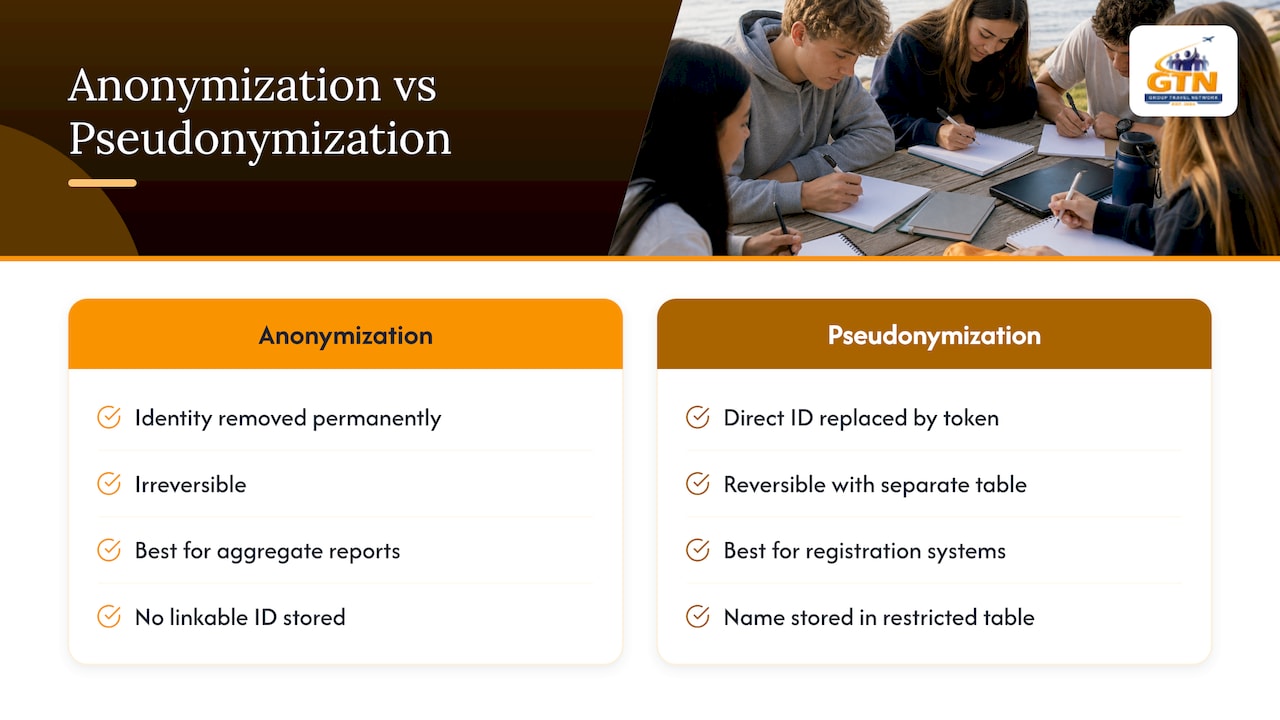
Not every piece of registration data needs to stay linked to a name forever. Anonymization strips identifying details permanently, useful for data you keep only for aggregate reporting, like attendance counts by grade level. Pseudonymization replaces a direct identifier with a token or reference number while keeping the real identity in a separate, more tightly controlled table, which is often the better fit for registration systems because staff still need to match records to real people for logistics.
A practical version: store a student’s name and contact details in one restricted table, and reference that record by an internal ID everywhere else, including logs, reports, and any data shared with a vendor for shipping or scheduling. If that secondary data is ever exposed, it reveals far less on its own.
This approach also shrinks what auditors and attackers both see. A support ticket about a registration issue rarely needs to display a full record, just the ID and the specific field in question. Review which internal tools and reports actually need the full identity attached versus the token, and tighten access accordingly. The fewer places a full name and birthdate appear together, the smaller your exposure if any single system is compromised.
Security training and awareness programs for staff managing registration data
Technical controls fail quietly when the people operating them do not understand why they matter. Staff who manage registration data, coordinators, front-desk admins, seasonal help, need training that covers more than a generic phishing slideshow once a year.
Cover the basics specific to the job: recognizing a phishing attempt aimed at stealing admin credentials, understanding why a parent’s request to “just email the spreadsheet” is a risk, and knowing the exact steps to take if they suspect an account or device has been compromised. A tool like SmishAlert can help staff capture and report suspected phishing or smishing attempts rather than guessing whether a message is legitimate.
Training works best when it is tied to the actual systems people use daily, not abstract scenarios. Walk new hires through the registration platform’s access controls during onboarding, not months later. Refresh the training whenever you change vendors, add a new form field type, or respond to an incident, since each of those changes the specific risks staff need to recognize. A short annual refresher, paired with a simulated phishing test, tends to catch more gaps than a single long session ever does.
Regular security assessments and penetration testing specific to registration systems
A registration form that passed a security review two years ago is not necessarily secure today. NIST’s guidance on cybersecurity risk treats security as continuous rather than a one-time project, and registration systems that handle personal data for minors or payment information deserve that same ongoing attention.
A basic assessment schedule includes an annual review of access permissions, a periodic external scan of the registration site for known vulnerabilities, and a penetration test focused specifically on the registration workflow rather than a generic network scan. Penetration testing a registration system means checking whether form validation can be bypassed, whether an authenticated low-privilege user can reach records they should not see, and whether file upload fields can be abused to plant malicious content.
A checklist like Tatem Web Design’s SMB security guide gives smaller organizations a starting point if a full penetration test is out of budget. Even a lighter self-assessment, run consistently, catches configuration drift before it becomes an incident. Document findings and remediation timelines each time, since a review with no follow-through provides little real protection.
Backup and disaster recovery plans for registration databases
Losing access to your registration database, whether from ransomware, a failed migration, or simple hardware failure, is its own kind of data security problem. A backup plan should cover both how often data is backed up and how quickly it can be restored.
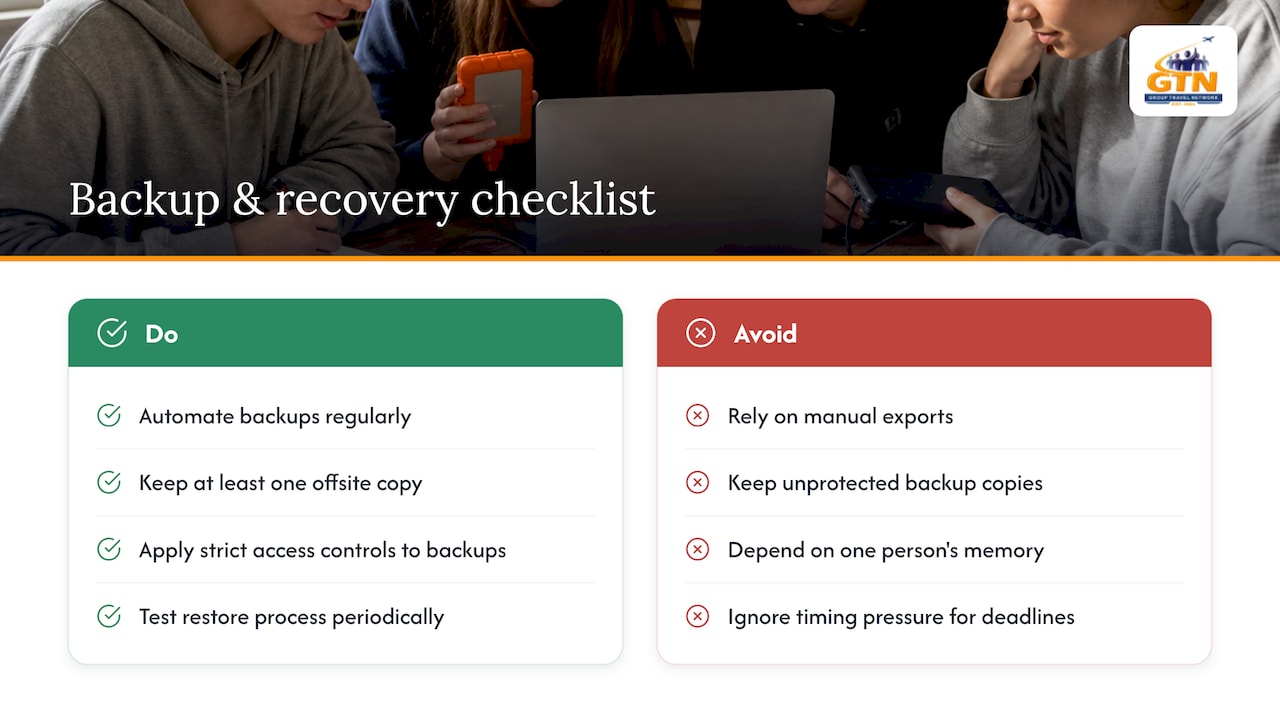
Automate backups rather than relying on someone remembering to export data manually. Store at least one backup copy somewhere separate from the primary system, ideally with access controls as strict as the live database, since an unprotected backup is just another copy of the same sensitive data waiting to be exposed. Test the restore process periodically rather than assuming the backup works; a backup nobody has ever restored is unverified by definition.
Write down the recovery steps so they do not depend on one person’s memory during a crisis: who has authority to initiate a restore, which systems need to be reconnected first, and how you will communicate with affected registrants if the system is down during an active registration period. For a school managing registration ahead of a deadline, even a few hours of downtime can mean missed payments or lost consent forms, so the recovery plan should account for timing pressure, not just technical steps.
Privacy by design principles applied to registration systems
Privacy by design means building data protection into a registration system from the first decision about what to collect, rather than bolting on safeguards after the form is live. It starts with the same minimization principle covered earlier: default every new field to “not collected” unless there is a clear reason to add it.
Apply the principle at each stage of the system’s life. When designing a new form, default settings should favor privacy, meaning opt-in consent rather than opt-out, and visibility limited to the smallest group of staff who need it. When integrating a new vendor, ask what data it will receive before signing, not after. When retiring an old registration campaign, delete the data rather than leaving it in an inactive database indefinitely.
The practical payoff shows up during an incident. A system built around minimal collection and strict access from the start has less to expose and fewer places an investigator has to check. Retrofitting privacy into a system that was never designed with it is possible, but it is slower and more error-prone than building it in from the first form field.
What admins get wrong about prioritizing registration security
Most organizations treat registration security as a single project to finish rather than a set of habits to maintain. The highest-leverage work, TLS, admin MFA, and trimming unnecessary fields, takes hours, not months, yet it gets delayed because it sits behind bigger-looking initiatives like a full platform migration.
Logging and vendor inventory are the pieces that quietly rot if treated as one-time setup. Revisit them on a calendar, not when something breaks. When a form touches health data or stores financial identifiers, bring in legal counsel or an outside assessor rather than guessing at compliance; that is the one place where the cost of being wrong outweighs the cost of asking.
— Donovan
Group Travel Network: a managed option for secure group registration
Building and maintaining every control covered above takes time that most school administrators and band directors do not have during a busy travel season. Group Travel Network handles registration workflows, secure payment processing, and consent and medical form collection as part of planning Performance Tours, Educational Endeavors, and other group trips, so your staff is not the one responsible for patching a sign-up form between classes.
A dedicated trip coordinator manages the registration process alongside payment plans and travel protection options, which centralizes the security work instead of leaving it scattered across whichever tool a department happened to pick.
- Managed registration workflows built for student and youth group trips.
- Secure payment handling for deposits and installments.
- Coordinator support for medical and consent forms specific to travel.
| Service | What it covers |
|---|---|
| Performance Tours | Registration and coordination for school music and performance travel |
| Educational Endeavors | Managed registration for classroom and curriculum-based trips |
| Senior Class Trips | Registration and planning support for senior class travel |
If your school or group is planning a trip and wants the registration side handled by a dedicated coordinator, explore Performance Tours or visit Group Travel Network to see current options.
Sources
- Data Breach Response Guide: A Business Resource from the Federal Trade Commission
- Require multi-factor authentication | CISA guidance
- NIST Cybersecurity Framework (CSF) 2.0
FAQ
What are the four types of data security?
Data security is typically organized around encryption, access controls, backups, and monitoring or logging. Encryption protects data in transit and at rest, access controls limit who can view or change it, backups protect against loss, and logging detects misuse or intrusion after the fact.
How do I block my personal information from being found online?
You cannot fully remove personal information from the internet once it has been posted, but you can limit what organizations collect from you by reviewing privacy settings, opting out of data broker listings where available, and declining optional fields on registration forms. Reducing the number of forms that ask for unnecessary details limits future exposure.
How do I secure my data online?
Use phishing-resistant multi-factor authentication wherever it is offered, confirm that sites use TLS encryption before entering personal information, and avoid reusing passwords across accounts. For organizations, encrypting data at rest and limiting who has admin access matters as much as the form’s front-end security.
What are 5 ways to protect yourself online?
Use phishing-resistant MFA on important accounts, keep software and browsers updated, avoid entering sensitive data on sites without TLS, use unique passwords for each account, and be cautious about which personal details you submit to any online form. For organizations collecting that data, applying NIST’s Cybersecurity Framework gives a structured way to cover the same ground at scale.
Do online registration forms need to collect Social Security numbers?
No, a standard registration form rarely needs a Social Security number, and collecting one adds unnecessary risk if the data is ever exposed. Limiting fields to what the registration actually requires is one of the simplest ways to reduce exposure, as outlined in FTC guidance for businesses.
Recommended

Relax with our Student Travel Expertise .
We deliver stress-free student trips backed by an exceptional array of services you won’t find anywhere else:
- Stress-free, creative planning of customized itineraries
- Dedicated GTN Service host on every trip
- Extensive travel protection plan options
- Online, individual registration system
- Flexible payment plans and online payment options
- Bulk buyer discounts for great trips that cost less
Inclusion into #MyGTNFamily for life! (you don’t even have to remember our birthday!)
Spain
There is no place like Spain to offer a student performance opportunity or cultural student trip.
Myrtle Beach
All students love the beach! Especially a beach known for its 60 miles of pristine coastline.
Boston
Have your students experience colonial charm in the city that is considered the hub of New England.
London
Provide your student group with the “Royal” treatment! One of the world’s most recognized cities.
See What People Are Saying
“What wonderful trip we had to NYC! Our group of 51 never missed a beat because of Group Travel Network and our wonderful guide, Tim. It was truly a theatre trip to remember! If you are looking for a travel company who really cares about the details, Group Travel Network is for you!”
“It has been my privilege to use Group Travel Network as the exclusive travel coordinator for my band for over 10 years. I can say, without doubt or hesitation, that GTN is, by far, the best travel company for student groups currently in existence. I have often said that I wouldn’t take my band across the street without GTN and that’s not far from the truth!”
“This was my first time using a company to plan our band trip. It was so easy working with Justin and Group Travel Network. We had to make several changes along the way, but they were accommodating changes and worked everything out for us. I would highly recommend using Group Travel Network.”